
装在笔记本里的私有云环境:网络存储篇(上)( 五 )
文章插图
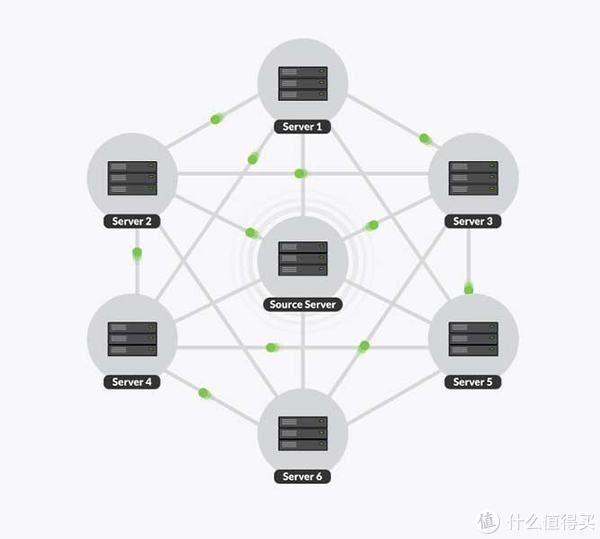
很早之前, 我购买了 Resilio File Sync(BTSync)的授权,但是因为一些原因,这个软件在国内使用起来越来越不方便。于是活跃的开源项目 Syncthing 便成了不二的替代品。和上文一样,我将 Syncthing 的配置文件,也上传到了 GitHub 中,简单说明一下这几个文件的用途:
主应用容器配置:docker-compose.yml可选的服务发现组件:docker-compose.discosrv.yml共用的环境变量配置文件:.env追求更高性能转发的配置目录: host-mode
和前文中的 MinIO 一样,一般情况下,我们只需要关注其中的 .env 配置文件即可。
# == SyncthingDOCKER_SYNCTHING_IMAGE_NAME=syncthing/syncthing:1.18DOCKER_SYNCTHING_HOSTNAME=syncthing-on-storageDOCKER_SYNCTHING_DOMAIN=syncthing.storage.lab.com# == discosrvDOCKER_DISCOSRV_IMAGE_NAME=syncthing/discosrv:1.18.0DOCKER_DISCOSRV_HOSTNAME=discosrv-on-storage
这里的配置相比较之前更简单一些,我们只需要关注和修改其中的域名即可。在配置修改完毕之后,我们使用 docker-compose up -d 启动 syncthing 主应用,稍等片刻当应用出现类似下面的日志的时候,我们的应用就启动完毕了(通过 docker-compose logs -f 查看)。
... ...syncthing-on-storage| [start] 08:36:24 INFO: Archiving a copy of old config file format at: /var/syncthing/config/config.xml.v0syncthing-on-storage| [V6PE5] 08:36:24 INFO: My ID: V6PE5XT-UKDCFHM-....syncthing-on-storage| [V6PE5] 08:36:25 INFO: Single thread SHA256 performance is 2093 MB/s using minio/sha256-simd (590 MB/s using crypto/sha256).syncthing-on-storage| [V6PE5] 08:36:25 INFO: Hashing performance is 1346.02 MB/ssyncthing-on-storage| [V6PE5] 08:36:25 INFO: Running database migration 1...... ...syncthing-on-storage| [V6PE5] 08:36:25 INFO: TCP listener ([::]:22000) startingsyncthing-on-storage| [V6PE5] 08:36:25 INFO: Ready to synchronize "Default Folder" (default) (sendreceive)syncthing-on-storage| [V6PE5] 08:36:25 INFO: Relay listener (dynamic+https://relays.syncthing.net/endpoint) startingsyncthing-on-storage| 2021/11/04 08:36:25 failed to sufficiently increase receive buffer size (was: 208 kiB, wanted: 2048 kiB, got: 416 kiB). See https://github.com/lucas-clemente/quic-go/wiki/UDP-Receive-Buffer-Size for details.syncthing-on-storage| [V6PE5] 08:36:25 INFO: QUIC listener ([::]:22000) startingsyncthing-on-storage| [V6PE5] 08:36:25 INFO: Loading HTTPS certificate: open /var/syncthing/config/https-cert.pem: no such file or directorysyncthing-on-storage| [V6PE5] 08:36:25 INFO: Creating new HTTPS certificatesyncthing-on-storage| [V6PE5] 08:36:25 INFO: GUI and API listening on [::]:8384syncthing-on-storage| [V6PE5] 08:36:25 INFO: Access the GUI via the following URL: http://127.0.0.1:8384/syncthing-on-storage| [V6PE5] 08:36:25 INFO: My name is "syncthing-on-storage"syncthing-on-storage| [V6PE5] 08:36:25 INFO: Completed initial scan of sendreceive folder "Default Folder" (default)...
在应用启动完毕之后,我们可以通过之前设置的域名在浏览器中访问啦:syncthing.storage.lab.com。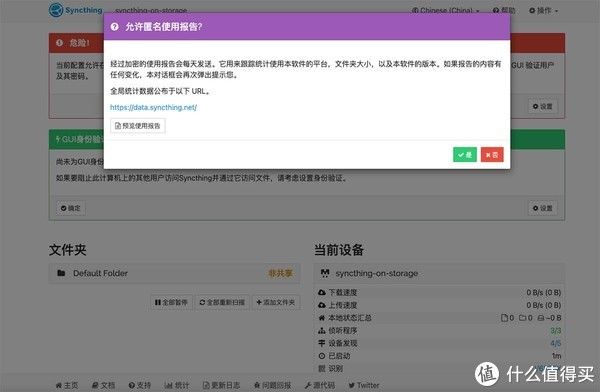
文章插图
如果我们只在内网环境使用,设备网络环境比较固定。比如在本文的环境下,可以考虑参考下面的配置将依赖公开服务的选项都关闭。然后点击右上角的菜单按钮,重启软件。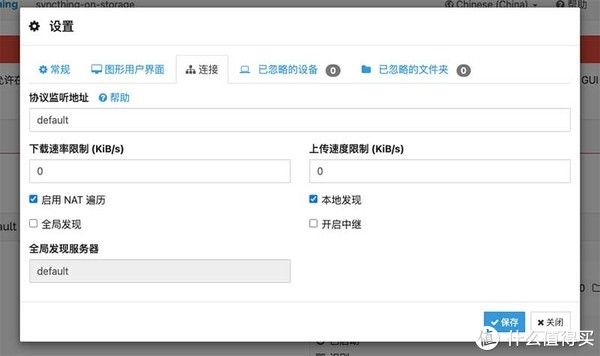
文章插图
但是如果使用上面的方式配置,我们所有的客户端之间的信任和关联,都将需要手动配置,为了简单直接一些,这里我们可以再多配置一个“专属于它的服务发现应用”,帮助我们进行一些自动化配置。
这里因为 Traefik 和 Syncthing 服务发现的证书传递存在一些问题,所以最简单的方案是使用 host-mode 中的服务发现配置,将配置复制到同级目录中。
- 架构设计|6G发展再迎里程碑 网络架构设计获突破
- 阿里巴巴|电商转折点出现?神秘消失23天的李佳琦,意外暴露了阿里的问题
- 往宇航员的血管里种藻类,科学家这个想法太疯狂,来看结果怎么样
- 和真的几乎一样,这个仿生蜻蜓,要实现《沙丘》里的扑翼机了
- 移动通信网络|6G发展再迎里程碑 网络架构设计获突破
- 腾讯|推荐6款免费软件,上班族最好放在电脑里
- 为什么同学群里,很少有人说话,大部分人都选择沉默或者屏蔽?
- 显卡|如何组装旗舰游戏电脑?这里有你想要的答案
- 笔记本|双芯协同!上手Reno8 Pro花仙紫,氛围感人像神器稳了
- 快手视频|视频号和抖音快手的差异化在哪里呢?你应该如何选择适合你的平台